Window Objects Method
Window Object Properties
1. Height and Width
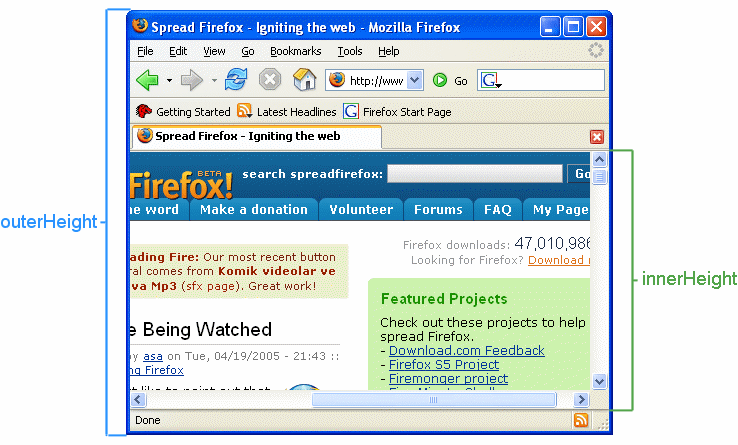
- window's content area (viewport) including scrollbars - 1. innerHeigh... 2. innerWidth
- The browser window, including toolbars/scrollbars - 1. outerHeight.... 2. outerWidth
Window Open - hierarchy,
open() - method opens a new browser window, or a new tab, depending on your browser settings and the parameter values. Synex =
window.open(URL, name, specs)Parameters are Optionalname - 1. _black............ 2. _parent............ 3. _self......... .. 4. _top specs - 1. fullscreen=yes|no|1|0........... . 2. height=pixels........... 3. left=pixels.......... . 4. location=yes|no|1|0......... .. 5. menubar=yes|no|1|0........... 6. resizable=yes|no|1|0........... 7. scrollbars=yes|no|1|0........... 8. status=yes|no|1|0.......... . 9. titlebar=yes|no|1|0......... .. 10. toolbar=yes|no|1|0............ 11. top=pixels........... 12. width=pixels
opener - returns a reference to the window that created the window.
- If window xxx opens window yyy
- yyy.opener returns xxx.
- yyy.opener.close() closes xxx.
<button onclick="myFunction()">Try it</button>

<script>
function myFunction() {
  const myWindow = window.open("", "", "width=300,height=300");
  myWindow.opener.document.getElementById("demo").innerHTML = "HELLO!";
}
</script>
- parent - returns the parent window (of the current window).
- top - returns the topmost window in the current browser window.
- The top property is not the same as the parent property.
- window.top returns the topmost window in the hierarchy of windows.
- window.parent returns the immediate parent of a window.
2. Storage
localStorage - The localStorage object stores data with no expiration date. The data is not deleted when the browser is closed, and are available for future sessions.
sessionStorage - object stores data for only one session. (The data is deleted when the browser is closed).
Save Data to Local Storage-
localStorage.setItem(key, value);Read Data from Local Storage-
let lastname = localStorage.getItem(key);Remove Data from Local Storage-
localStorage.removeItem(key);Remove All (Clear Local Storage)-
localStorage.clear();<p><button onclick="clickCounter()" type="button">Click me!</button></p> <script> clickCounter(); function clickCounter() { if (localStorage.clickcount) { localStorage.clickcount = Number(localStorage.clickcount)+1; } else { localStorage.clickcount = 1; } document.getElementById("demo").innerHTML = localStorage.clickcount; } </script>
Scroll
To Know Visiblity of - 1. scrollbars ........ 2. locationbar........ 3. menubar........ 4. personalbar........ 5. statusbar........ 6. toolbar
Window.scroll() -
top: 100, left: 100, behavior: 'smooth'
window.scrollBy() - thoda aur bas, whereas window.scroll() scrolls to an absolute position in the document
scrollx - returns the number of pixels that the document is currently scrolled horizontally. (scrolly)